
All the work you put into BoloUp, whether as a host or an agent—deserves a smooth, dependable payout experience. This guide walks you through everything: the prerequisites, a step-by-step breakdown of the withdrawal process, answers to the most common questions, and solutions to issues that tend to come up when you withdraw your earnings on BoloUp. Let’s get into it!
Before Withdraw Your Earnings on BoloUp
A Verified Email or Phone Number
Before anything else, make sure your BoloUp account has a verified email address or phone number attached to it. Check your profile to confirm your contact info is properly linked.
Minimum Account Balance of $10 USD
Withdrawals are only available once your balance reaches the minimum threshold, which is $10 USD on BoloUp.
An Active Payment Account
BoloUp processes payouts via bank transfer or e-wallet. Whichever option you choose, ensure the account is active and in good standing. Open the app to view the full list of supported payment methods in your region.
Step-by-Step Withdrawal Process on BoloUp
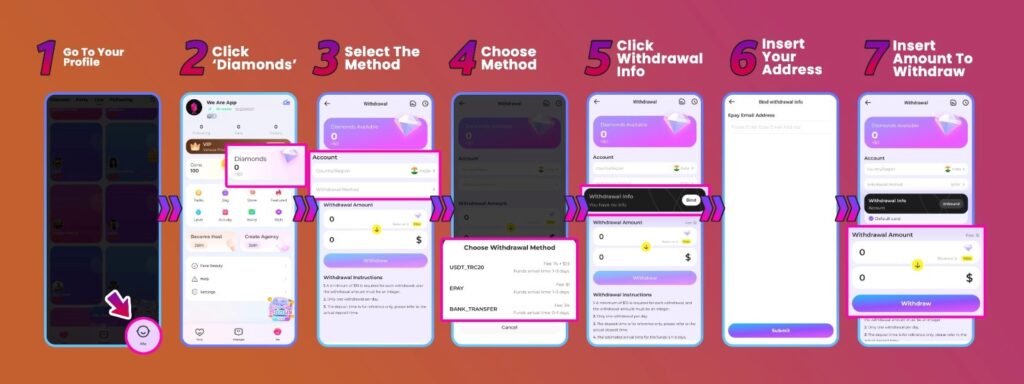
- Open the App and Head to Your Profile
Launch BoloUp and go to your profile. Whether you’re logged in as a host or an agent, the withdrawal process begins from the same location.
- Open the ‘Diamonds’ Menu
From your profile, tap the ‘Diamonds’ section. This is where your current balance is displayed and where the withdrawal process takes place.
- Select ‘Withdraw Method’
Inside the Diamonds section, tap ‘Withdraw Method’ to begin configuring how you’d like your payout to be delivered.
- Pick Your Preferred Payment Option
Choose the method that suits you best. BoloUp currently supports bank transfer, e-wallet, Payoneer, and USDT. Keep in mind that availability varies by country, so select from the options shown for your region.
- Link Your Payout Account via ‘Withdrawal Info’
After choosing your method, tap ‘Withdrawal Info’ to connect your payment account to your BoloUp profile. This step ensures your money goes to the right place every time.
- Enter Your Account Details
Fill in all the required fields to bind your payment account. Accuracy is essential here—any mistakes could delay or block your withdrawal.
- Enter Your Withdrawal Amount and Submit
Type in the amount you want to cash out and tap ‘Withdraw’ to confirm. Before finalizing, verify that your balance meets the $10 USD minimum, requests below this amount will not go through.
BoloUp Withdraw Earnings FAQ
What’s the minimum amount I can withdraw?
The smallest withdrawal amount on BoloUp is $10 USD. Your balance must reach this level before a payout can be requested.
Which payment methods are available?
BoloUp supports bank transfer, e-wallet, Payoneer, and USDT. Available options depend on your location—check the app to see what’s currently available in your area.
Are there any fees for withdrawing?
This depends on the payment provider you select. Some third-party services charge their own transfer fees, and these rates vary. We recommend reviewing your provider’s fee structure before initiating a withdrawal.
Can hosts withdraw their earnings independently?
Yes—hosts have full control over their withdrawals and can request a payout whenever their balance qualifies.
What if I connected the wrong payment account?
No worries—there are no restrictions on updating payment details on BoloUp. You can unlink and replace your payment account from your profile at any time.
Why can’t I see a specific payment method?
Certain payment options are region-specific. If a method isn’t showing up, it’s likely not supported in your area. Choose from the options that are currently visible to you.
My withdrawal is taking longer than expected—what should I do?
Standard withdrawals are processed within seven business days under normal conditions. If yours has been pending beyond that timeframe, contact our support team and we’ll investigate and follow up promptly.
Getting Paid on BoloUp Is Simpler Than You’d Think
Once your requirements are all sorted, cashing out your BoloUp earnings is a smooth and painless experience, for both hosts and agents alike. The key to a seamless withdrawal every time is making sure your payment details are accurate and your preferred method is properly configured before you confirm the transaction.
Have more questions about withdrawals or anything else on BoloUp? Our support team is always available and happy to help. Reach out anytime, and be sure to check our blog for more practical tips, step-by-step guides, and tutorials to help you make the most out of your time on the platform.