
As a BoloUp agent, a significant portion of your commissions is tied directly to the quality and activity level of your host roster. That means recruitment isn’t just something you do, it’s one of the highest-return activities you can invest your time in. The more skilled and consistently active hosts you bring on board, the more your earnings will scale alongside theirs. The good news? The BoloUp hosts recruit process is simple and easy to follow.
Steps to Recruit New Hosts to Your BoloUp Agency
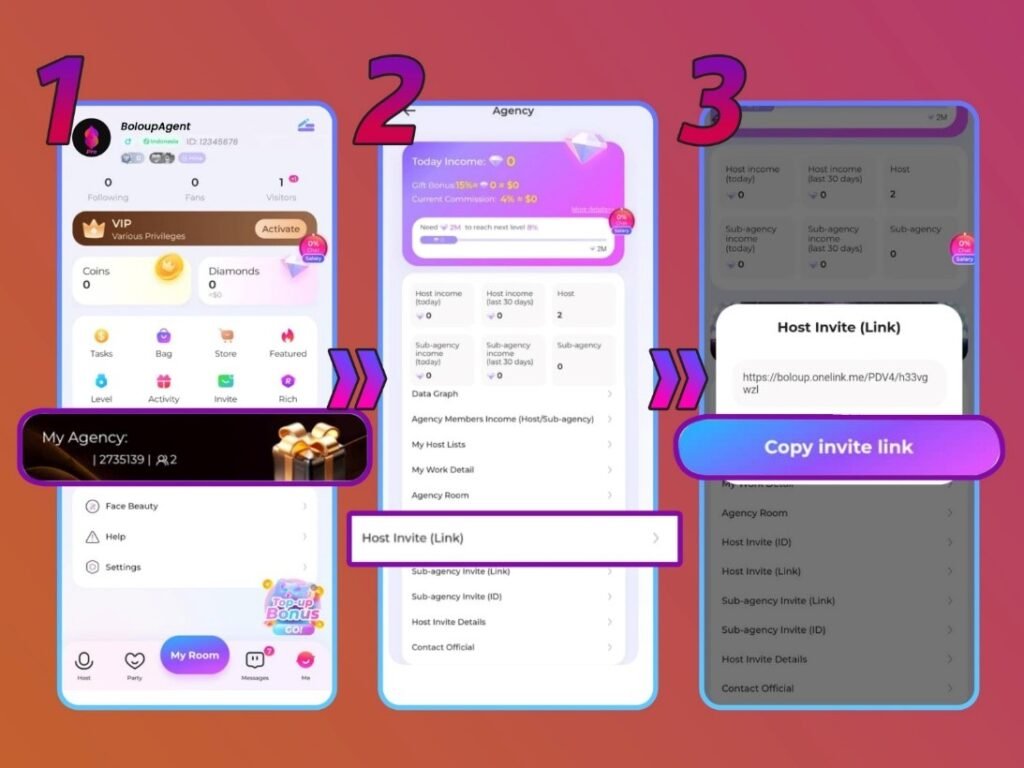
Step 1: Access Your Profile and Open ‘My Agency’
Launch the BoloUp Live app and navigate to your profile page. From there, tap the ‘My Agency’ button to open your agent dashboard, where all host management and recruitment tools are housed.
Step 2: Select the ‘Host Invite Link’ Option
Within the ‘My Agency’ section, find and tap ‘Host Invite (Link)’. This is where your unique invitation link is generated and ready to be shared.
Step 3: Share the Invitation Link
Copy the link and send it to any potential host you’re looking to recruit. You can distribute it through social media, messaging apps, or any other platform you use to reach candidates.
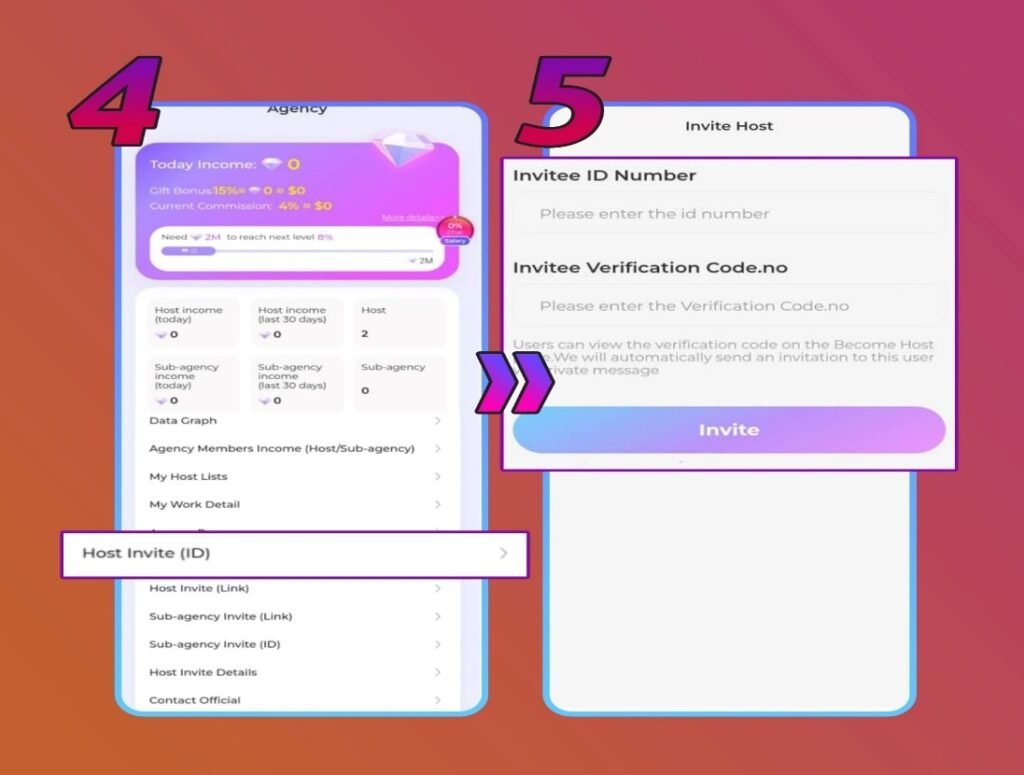
Step 4: Use the ‘Host Invite (ID)’ Method as an Alternative
If you prefer a more targeted approach, tap ‘Host Invite (ID)’ in your agency menu instead. This method lets you send an invitation to a specific host using their account details directly.
Step 5: Input the Host’s ID and Verification Code
When using the ID method, you’ll need to enter both the host’s unique ID and their verification code. Confirm these details with the host beforehand and double-check accuracy before submitting, any error may cause the invitation to fail.
Host Invitation Issues and How to Fix Them
My invitation was sent but the host couldn’t join
This typically happens for one of two reasons: either there was a typo in the Host ID, or the host is already affiliated with another agency. Reach out to the host to verify their details and resend the invitation once everything is confirmed.
I want to recruit someone who’s already with another agency
You’ll need to wait. A host must formally exit their current agency and have that departure approved before you can extend an invitation for them to join yours.
Host Recruitment FAQs for BoloUp Agents
Will a newly recruited host immediately contribute to my earnings?
Yes, as long as they’ve completed both face and ID verification, they’ll start generating earnings for you as soon as they join.
Are there any performance benchmarks I need to maintain as an agent?
Yes. BoloUp has activity-based standards in place for agents, covering both how many hosts you’ve recruited and how active your team is overall. If your entire team, including hosts and sub-agents, goes inactive for a full month, your agency may be closed and your members transferred to BoloUp’s official agency. These requirements can change, so check with our team for the latest information.
What do I do if I don’t have the host’s ID or verification code?
The ID and verification code are only required when using the ID-based invitation method. If you’re going that route, contact the host directly and ask them to provide both details before proceeding.
Every Host You Recruit on BoloUp Strengthens You
That covers everything you need to know about bringing new hosts into your BoloUp agency. Keep in mind that your growth as an agent, both the size of your community and the depth of your income, depends on the number of engaged, active hosts on your team. Have questions about the recruitment process or other aspects of being a BoloUp agent? We’re always here to help. Reach out anytime and visit our blog for more in-depth guides and resources.